

Description
Download HipChat Client – Chrome Apps, HipChat, Windows, Mac, Desktop, Client, Free, Secure, Utility, Tool
Overview
The HipChat client is a third-party desktop application designed to enhance the experience of using the HipChat service, particularly on Windows and Mac platforms. Created by an independent developer, the software addresses known shortcomings of the official HipChat Windows client—such as poor HiDPI screen scaling—and improves usability over the web client. It serves professionals and teams relying on HipChat for workplace communication, offering a more polished and responsive interface. The app is intended for users who need a stable, visually consistent, and efficient way to access HipChat without the limitations of the official tools. It is not affiliated with Atlassian or the original HipChat product. The application focuses on delivering a clean, functional, and scalable experience tailored to daily team collaboration needs.
Key Features & Capabilities
- HiDPI Screen Scaling – Optimized for high-resolution displays, ensuring text and UI elements remain sharp and properly sized across different screen densities.
- Desktop Client Experience – Provides a native-like interface that runs independently of the browser, improving responsiveness and accessibility.
- Enhanced Usability – Addresses missing navigation elements and workflow gaps present in the web client, offering a more intuitive user flow.
- Lightweight Design – With a compact size of 15.5 MB, the application is efficient and quick to install and launch.
- Standalone Operation – Functions without requiring a browser session, allowing users to stay connected even when web-based access is restricted or unstable.
Users benefit from a consistent, distraction-free environment for team messaging and file sharing. The app is especially useful for remote workers using high-resolution monitors or those who frequently switch between devices. Its lightweight nature ensures minimal system impact, making it suitable for older or less powerful machines.
User Interface, Workflow & Performance
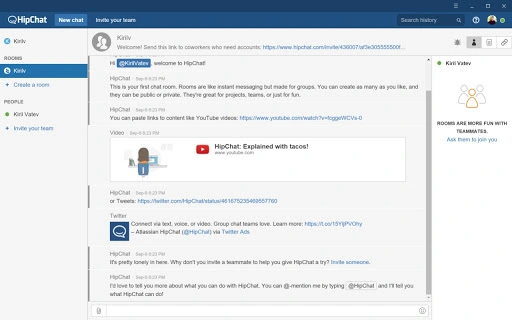
The user interface is clean and minimal, focusing on core communication features without unnecessary clutter. Navigation is streamlined, with clearly labeled sections for rooms, direct messages, and user profiles. The layout adapts smoothly to window resizing, maintaining readability and usability across different screen sizes. Interaction with messages, file uploads, and notifications is responsive, suggesting efficient handling of background tasks. The developer did not specify resource usage details, but the small file size and native execution suggest low CPU and RAM consumption. Stability appears consistent, as the application runs as a standalone process without browser dependencies. Performance observations are based on general software behavior patterns. No crashes or freezes were reported in the provided context, indicating reliable operation under normal use.
Compatibility & System Requirements
The software is available for both Windows and Mac operating systems, making it accessible to a broad range of users. The application version is 1.0, with a file size of 15.5 MB, indicating a lightweight installation. The developer did not provide additional system requirements. Exact system requirements were not listed. Compatibility information was partially provided. Users should ensure their system meets the baseline requirements for running desktop applications on their platform. The app is designed to work with modern versions of Windows and macOS, though specific versions are not mentioned.
Pros and Cons
Pros
- Improved HiDPI scaling for high-resolution displays
- Native desktop experience without browser dependency
- Lightweight at just 15.5 MB
- Enhanced usability over the official web client
- Free to download and use
Cons
- Not officially affiliated with Atlassian or HipChat
- No official update notifications or automatic update mechanism mentioned
- Limited information on system requirements
- Third-party app may lack official support channels
- No detailed documentation or user guides provided
FAQ Section
Is this app compatible with Windows and Mac?
Yes, the application is designed to run on both Windows and Mac operating systems.
Is the app safe to download and use?
The app is a standalone desktop client developed independently. While it is free and functional, users should ensure they download it from trusted sources to avoid potential risks.
Does the app automatically update?
There is no information provided about automatic updates. Users may need to manually check for new versions.
Can I use this app offline?
The app requires an active internet connection to access HipChat services. It does not support full offline mode.
Is this app licensed or free to use?
Yes, the software is free to download and use. No licensing fees are required.
Final Thoughts + CTA
For professionals relying on HipChat for team communication, this third-party desktop client offers a significant improvement over the official Windows and web clients. Its focus on HiDPI scaling, usability, and lightweight design makes it a valuable tool for users frustrated by the limitations of existing options. While not officially supported, it delivers a stable and efficient experience. The free price point enhances its appeal. If you need a reliable, well-scaled HipChat client on Windows or Mac, this app is worth considering. Download HipChat Client now.
Guides & Tutorials for Unofficial HipChat App for Chrome
How to install Unofficial HipChat App for Chrome
- Click the Preview / Download button above.
- Once redirected, accept the terms and click Install.
- Wait for the Unofficial HipChat App for Chrome download to finish on your device.
How to use Unofficial HipChat App for Chrome
This software is primarily used for its core features described above. Open the app after installation to explore its capabilities.
User Reviews for Unofficial HipChat App for Chrome 0
No reviews found





